K8 Game – Download, Register, Deposit and Play
Just Now
10.3 MB
v.5.99
Android+5
15K

Description
K8 Game is a mobile gaming platform where users can explore different online games from one place. The platform is designed for people who prefer playing games on their smartphones and want a simple way to access their account and available gaming options.
For a new user, the first step is to understand how the platform works. This includes downloading the K8 Game APK, installing it on an Android phone, creating an account, logging in, and understanding the deposit and withdrawal process.
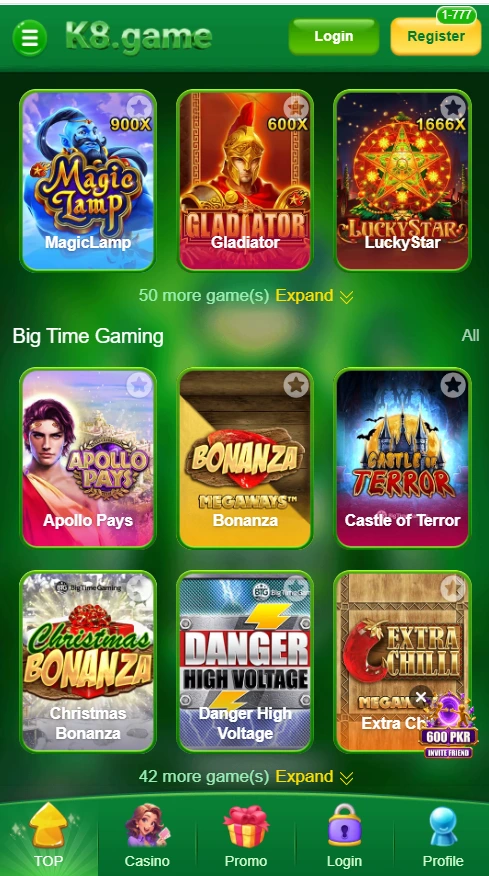
What Is K8 Game?
K8 Game is an online gaming platform that can be accessed through a mobile device. After opening the platform, users can check the available games and account options from the main interface.
The exact games and features may change when the platform receives updates. For this reason, users should check the current version after installation rather than relying on old information.
K8 Game Features
K8 Game focuses on keeping the main account and gaming options accessible from one place. Some of the useful areas users may find include:
- Mobile-friendly gaming interface
- Different game categories
- User registration and login
- Account balance section
- Deposit options
- Withdrawal options
- Promotional or bonus sections when available
- Account support options
K8 Game APK Download
Before downloading any APK, make sure you are using a trusted source. Do not install files that look suspicious or ask for unnecessary permissions.
How to Download K8 Game APK
The basic process is simple:
- Open your browser on your Android phone.
- Go to the K8 Game download page you trust.
- Find the K8 Game APK Download button.
- Tap the download button.
- Wait for the APK file to finish downloading.
- Open the downloaded file from your Downloads folder.
How to Install K8 Game on Android
After downloading the APK, you can install it on your Android phone.
Open the downloaded APK file and follow the installation instructions shown on your screen. If Android asks you to allow installation from an unknown source, only enable the permission for a source you trust.
Once installation is complete, open K8 Game from your phone’s app menu.
How to Register on K8 Game
New users normally need to create an account before using account-related features.
Open K8 Game and look for the Register or Sign Up option. Enter the required information carefully. Depending on the current registration form, this may include a mobile number, password, or verification code.
After entering your details, check them once before submitting the form.
Registration Steps
- Open K8 Game.
- Tap Register.
- Enter the requested information.
- Create a strong password.
- Complete verification if required.
- Submit the registration form.
- Save your login details somewhere secure.
Never give your password or OTP to another person.
How to Login to K8 Game
If you already have an account, you can use the Login option instead of registering again.
Enter the mobile number, username, or other login information connected with your account. Then enter your password and complete verification if requested.
K8 Game Deposit Method
Before making a deposit, check the payment methods currently shown inside your K8 Game account.
The exact options may vary, so users should always follow the instructions displayed in their own account.
How to Deposit
- Login to your K8 Game account.
- Open the Wallet, Deposit, or similar section.
- Select an available payment method.
- Enter the amount you want to deposit.
- Follow the payment instructions.
- Complete the transaction.
- Return to your account and check the balance.
K8 Game Withdrawal Method
Basic Withdrawal Steps
- Login to your account.
- Open the wallet section.
- Select Withdraw.
- Choose an available payment method.
- Enter the required payment details.
- Enter the withdrawal amount.
- Check all information carefully.
- Submit the request.
- Wait for the transaction to be processed.
Withdrawal time can depend on the payment method and the platform’s current rules.
Check Deposit and Withdrawal Rules First
Before depositing money, users should read the current payment rules. Look for the minimum deposit, minimum withdrawal, possible fees, verification requirements, and any conditions attached to bonuses.
This small step can prevent problems later.
If a payment is pending, avoid sending the same amount repeatedly. First check your transaction history or contact the platform’s support team.
How to Play K8 Game
After registration and login, open the game section and choose an available game.
If you are trying a game for the first time, read its instructions before starting. Understand how the game works and check whether it involves real-money play.
Account Safety Tips
Keeping your account secure is important.
Use a password that you do not use on other websites. Keep your OTP and login details private. Avoid saving passwords on public or shared computers.
K8 Game for New Users
First download and install the application. Then create your account and explore the interface. Check the wallet and payment sections so you understand how they work.
Only after understanding the rules should you decide whether you want to deposit money.
Responsible Gaming
Online games involving money should be used responsibly. Set a spending limit before you start and never use money needed for household expenses, bills, education, or other important needs.
A game should not become a reason to borrow money or chase losses. If you lose money, do not increase your spending simply to recover it.
Final Thoughts
K8 Game provides a mobile-based way to access available online games and account features from one place. For beginners, the main process is straightforward: download the APK, install the application, register an account, login, check the available games, and understand the wallet before making a deposit.
K8 Game FAQs
What is K8 Game?
K8 Game is a mobile gaming platform where users can access available online games from one place.
How can I download K8 Game APK?
Open a trusted download page, download the K8 Game APK, and install it on your Android phone.
How do I register on K8 Game?
Open the app, tap Register, enter the required details, complete verification, and create your account.
How can I deposit money in K8 Game?
Login to your account, open the Deposit or Wallet section, select an available payment method, and follow the instructions.
How can I withdraw money from K8 Game?
Open your account’s Withdraw section, select an available payment method, enter the required details, and submit your withdrawal request.
Download links
How to install K8 Game – Download, Register, Deposit and Play APK?
1. Tap the downloaded K8 Game – Download, Register, Deposit and Play APK file.
2. Touch install.
3. Follow the steps on the screen.